AMLConsensus · course
Section 2 · Lesson 2.3with video
Programme · Lesson 2.3
Reading a transaction in an explorer, step by step
A blockchain explorer is the analyst's main free tool. Let's learn to open a transaction and read its key fields on two real examples: an "empty" trap transaction and an honest transfer of 100 million USDT.
▶ Video lesson: how to open an explorer and read a transaction.
1. How to open a transaction
- Open an explorer. For Ethereum —
eth.blockscout.comoretherscan.io. For TRON — tronscan.org; for Bitcoin — mempool.space.All explorers are laid out similarly; we use Blockscout — it requires no registration. - Paste an address or hash into the search bar at the top and press Enter.A transaction hash is a long identifier like
0x87c6e5…that you see in your wallet or receive from a counterparty. - The "Transaction details" page opens. Let's break it down part by part.
2. A trap example: the "empty" transaction
Here is a real transaction, 0x87c6e5…bf73, from 3 May 2024. At first glance an ordinary transfer — but it is exactly what a $68M theft began with.
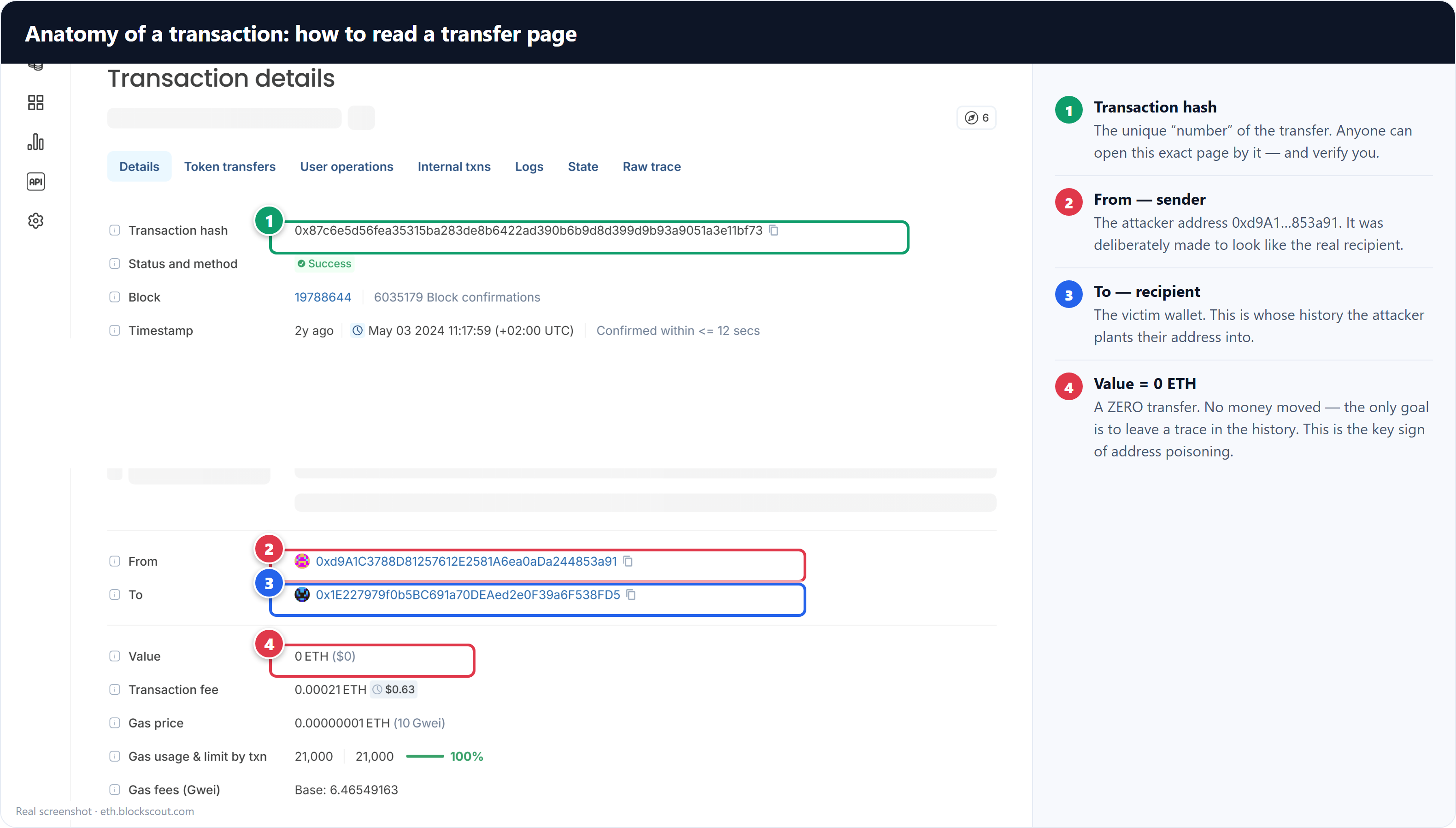
A real screenshot. Open the original →
- Transaction hashThe transfer's "number." Anyone can use it to open this same page and check you.
- From / ToSender and recipient. Clicking an address opens its wallet (Lesson 2.4).
- ValueHere it's 0 ETH — the main clue. Why pay a fee to transfer zero?
- Transaction feeThe network fee. The sender always pays it, even for an empty transfer.
The analyst's first question. An honest transaction always has an economic purpose. A transfer "of zero" has none — which means the purpose lies elsewhere: to leave a trace in someone's history. This is a sign of address poisoning (Section 7).
3. A benchmark example: an honest 100M USDT transfer
Let's compare it with a genuine large token transfer. Here is a transaction for 100,000,000 USDT to a Binance hot wallet.
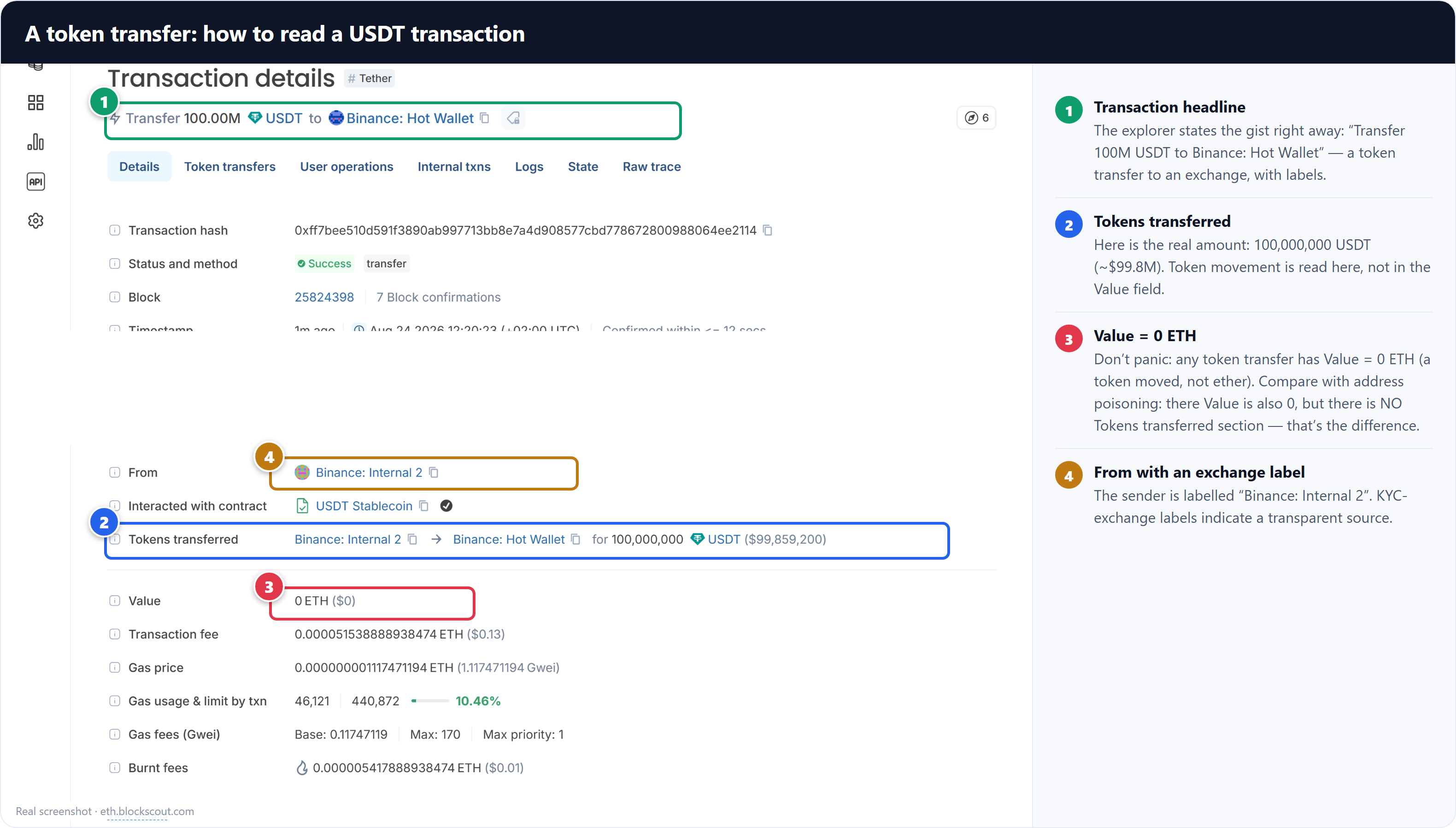
A real USDT transfer with exchange labels.
- The headerThe explorer states the gist right away: "Transfer 100M USDT to Binance: Hot Wallet."
- Tokens transferredHere is the real amount — 100,000,000 USDT. Token movements are viewed exactly here.
- Value = 0 ETHEven this honest transfer has a Value of 0 ETH! Because what moved was a token, not ether.
The key comparison. Both transactions have a Value of 0 ETH. But the honest one has a Tokens transferred section with 100M USDT, while the trap transaction does NOT — nothing at all moved there. It's precisely this difference that distinguishes a real transfer from a "blank." Don't judge by the Value field alone.
Lesson summary
- A transaction is read by its fields: hash, From/To, Value, fee.
- A Value of 0 ETH means nothing on its own — for token transfers it's always 0.
- Check the Tokens transferred section: if a token moved, it's a real transfer; if not, it's a "blank."
- A transfer "of zero" with no tokens is a red flag for address poisoning.
All screenshots are real (eth.blockscout.com).